We staged a rollout with six copies of an app. Kubernetes reported that the update succeeded. All six copies answered the health check. One was still running the old software.
The older copy belonged to a separate group that the update never touched. It remained on the list of copies that could take requests. That’s the stale-copy problem. You can get a clean result for the group you updated while customers can still reach an older copy.
We used a real Brotli security update for the lab. Brotli unpacks compressed data. OpenAI says GPT‑6 Cyber helped its researchers demonstrate what the flaw could do. The public records show which Node.js and .NET releases carry the fix. The lab shows what to check after you install one. See the release records.
CVE-2026-111497 patch timeline for Node.js and .NET
OpenAI says its researchers used GPT‑6 Cyber alongside other models to develop and validate exploits for the Brotli flaw. Node.js credits OpenAI researchers with reporting CVE-2026-111497. We couldn’t verify the date of the first private report. [1] [12]
| Project and release date | Fixed versions and release records |
|---|---|
| Brotli | 1.2.1. The upstream release lists the fix. [10] |
| Node.js | 22.23.4, 24.22.1, 26.12.1. The 24.22.1 notes identify upstream commit 0ed4268. [12] [13] |
| Microsoft .NET | 8.0.33, 9.0.22, 10.0.14. Microsoft documented fixed installers and container images. [14] |
Kubernetes lab: The rollout passed while one replica still ran the old build
Five of six endpoints were patched. We tested CVE-2026-111497 rollout verification on an isolated K3s cluster (v1.33.6+k3s1). A single Service selected five replicas from api and one from api-legacy. All six started on Node.js 24.22.0. The vendor’s release notes identify 24.22.1 as the fixed version for that release line. [13]
1. Update the main Deployment and look for what it missed
We updated api to node:24.22.1-alpine. Its rollout succeeded. That status covered api alone. The same Service still selected the legacy replica. [20] [22]
$ kubectl --context default -n brotli-rollout-lab set image deployment/api api=node:24.22.1-alpine
deployment.apps/api image updated
$ kubectl --context default -n brotli-rollout-lab rollout status deployment/api --timeout=180s
deployment "api" successfully rolled out
We listed the Service’s ready EndpointSlice addresses and sent an HTTP request directly to each one from inside the cluster. The lab’s /health handler returned the responding pod name and the Node.js version running in that process. All six answered with HTTP 200, including the stale replica.
READY_ENDPOINT HTTP NODE
api-5cb5f6cd9f-8kh4v 200 v24.22.1
api-5cb5f6cd9f-97l7b 200 v24.22.1
api-5cb5f6cd9f-bls5j 200 v24.22.1
api-5cb5f6cd9f-xrmkf 200 v24.22.1
api-5cb5f6cd9f-zzsj4 200 v24.22.1
api-legacy-56f9f9cbf4-zhntw 200 v24.22.0
2. Update the legacy Deployment and probe all six again
$ kubectl --context default -n brotli-rollout-lab set image deployment/api-legacy api=node:24.22.1-alpine
deployment.apps/api-legacy image updated
$ kubectl --context default -n brotli-rollout-lab rollout status deployment/api-legacy --timeout=180s
deployment "api-legacy" successfully rolled out
The stale pod was gone from the ready endpoint set. Its replacement and all five main replicas answered on 24.22.1.
READY_ENDPOINT HTTP NODE
api-5cb5f6cd9f-8kh4v 200 v24.22.1
api-5cb5f6cd9f-97l7b 200 v24.22.1
api-5cb5f6cd9f-bls5j 200 v24.22.1
api-5cb5f6cd9f-xrmkf 200 v24.22.1
api-5cb5f6cd9f-zzsj4 200 v24.22.1
api-legacy-85456dcd77-h8c22 200 v24.22.1
See the exact endpoint commands and the before-and-after image IDs
These are the inventory, endpoint selection and direct HTTP probe commands from the run. The probe shown targets the stale replica. The image inventory below shows only the two legacy rows, one from each snapshot.
$ kubectl --context default -n brotli-rollout-lab get endpointslice -l kubernetes.io/service-name=api -o go-template=\{\{range\ .items\}\}\{\{range\ .endpoints\}\}\{\{if\ .conditions.ready\}\}\{\{.targetRef.name\}\}\{\{\"\\t\"\}\}\{\{index\ .addresses\ 0\}\}\{\{\"\\n\"\}\}\{\{end\}\}\{\{end\}\}\{\{end\}\}
$ kubectl --context default -n brotli-rollout-lab exec api-5cb5f6cd9f-8kh4v -- node -e const\ \[ip\,\ expectedPod\]\ =\ process.argv.slice\(1\)\;\ fetch\(\"http://\"\ +\ ip\ +\ \":3000/health\"\,\ \{signal:\ AbortSignal.timeout\(5000\)\}\).then\(async\ r\ =\>\ \{\ const\ body\ =\ await\ r.json\(\)\;\ if\ \(\!r.ok\ \|\|\ body.pod\ \!==\ expectedPod\)\ throw\ Error\(\"unexpected\ endpoint\ response\"\)\;\ console.log\(body.pod\ +\ \"\ \"\ +\ r.status\ +\ \"\ \"\ +\ body.node\)\;\ \}\).catch\(e\ =\>\ \{\ console.error\(e\)\;\ process.exitCode\ =\ 1\;\ \}\)\; 10.42.0.22 api-legacy-56f9f9cbf4-zhntw
$ kubectl --context default -n brotli-rollout-lab get pods -l app=api -o custom-columns=POD:.metadata.name\,TRACK:.metadata.labels.track\,IMAGE:.spec.containers\[0\].image\,IMAGE_ID:.status.containerStatuses\[0\].imageID --sort-by=.metadata.name
POD TRACK IMAGE IMAGE_ID
api-legacy-56f9f9cbf4-zhntw legacy node:24.22.0-alpine docker.io/library/node@sha256:44fce696f38ba8c987c4db89954051000bbd05ffd8d8659ba15ed4a8602e937f
api-legacy-85456dcd77-h8c22 legacy node:24.22.1-alpine docker.io/library/node@sha256:06d7adf3e0ef61a13f1d28682726366f97a15aa1888c934d3ecec86c33918b53Run the script with bash brotli-rollout-lab.sh YOUR_LAB_CONTEXT against a disposable cluster. It creates the namespace brotli-rollout-lab. We verified the running builds and their HTTP responses in this lab. We did not run an exploit or test a production service.
What to bring to a production sign-off. Record the advisory, expected build digest, observed image IDs for the instances in scope, and a normal service request after deployment. Check each traffic pool, including separate Deployments or regions. Give any unverified instance an owner and a recheck time. [19]
For .NET, check where the runtime lives. If the app bundles its runtime, rebuild and redeploy the app with the patched runtime. If the app uses a shared runtime, update that runtime where the app runs. [21]
These releases are historical reference points. Check the current security notice for the product and release line you run.
Five questions before you sign off
Say your booking or checkout service needs this update. Your provider says, “The rollout is green.” Before you close the ticket, find out whether that covers every copy of the service customers can reach. You can ask for the evidence without knowing how to read a Kubernetes command.
| Ask this | What a useful answer includes |
|---|---|
| Which copies could take requests? | Ask for the service and its active regions, older deployments and standbys. Have the owner list anything outside the check. |
| Which build did you expect? | Ask for the vendor’s fix reference and the specific version or approved build your team set out to install. |
| What was running after the rollout? | Ask for the dated version or build record for each copy, including any copy the report couldn’t reach. |
| Does the service still work? | Ask for the result of a normal customer action after the change, such as opening checkout or looking up a booking. |
| What’s still open? | Ask who owns each exception and when they will check it again. For a copy taken out of service, ask who will verify it before it can take requests again. |
How to read the reply
“Five of six copies verified, one taken out of service pending an update, platform team rechecking at 4 p.m.” tells you how much work remains and who is doing it. Put that in the handoff as an open item. If your provider says the flaw does not apply, ask them to name the product or version they checked and what rules it out. On a hosted service, they may give you an advisory or a dated status statement instead of access to their infrastructure.
For your own laptop, the short version is to use your vendor’s update channel, restart when prompted, then check that the new version is running. See the personal-device steps. If you’re coordinating a team, turn the reply into a short action plan with a named owner and review date.
Check your own Kubernetes Service
For the person running the service. The lab above recreates the mistake. This separate checker is for a Service you already operate. It reads Kubernetes’ list of eligible endpoints and checks the running image for the app container in each distinct pod. An image digest is a fingerprint for a build. Give the checker the approved fingerprint from your release record so it can flag a different one. [19] [22]
Run the checker and interpret its result
Use Python 3 and kubectl with a context authorized to get Services and pods and list EndpointSlices in the namespace. Use a Service with a pod selector and normal readiness settings. Replace each placeholder below and set --min-pods to the minimum number of distinct ready pods you expect after the rollout. Repeat --digest if the release has more than one approved runtime image digest.
python3 service-image-check.py \
  --context YOUR_CONTEXT --namespace YOUR_NAMESPACE \
  --service YOUR_SERVICE --container YOUR_APP_CONTAINER \
  --digest YOUR_APPROVED_SHA256_DIGEST --min-pods 6
Use the digest your container runtime reports for the approved build. Check it against trusted release evidence, such as a verified staging pod. A digest from a multi-platform image index can differ from the digest recorded by the runtime. Use python3 service-image-check.py --help for the options. On Windows, py -3 works in place of python3 if Python Launcher is installed. Put the arguments on one line in PowerShell.
Exit code 0 means the pods checked match the approved digest list. Code 1 means a mismatch. Code 2 means the tool could not establish coverage, for example because access was denied, too few pods were ready, or the Service’s endpoint records changed during the run. Resolve that before using the result for sign-off.
These are excerpts from the same checker run before and after we switched the lab’s legacy pod back to the fixed build.
MISMATCH api-legacy-56f9f9cbf4-zkb87 sha256:44fce696f38ba8c987c4db89954051000bbd05ffd8d8659ba15ed4a8602e937f
FAIL: 1 of 6 ready Pods reported an unexpected image digest
Exit code: 1

PASS: 6 ready Pods reported approved image digests
Exit code: 0

INCONCLUSIVE: found 6 distinct eligible Pods; expected at least 7
Exit code: 2
The checker makes API reads. It does not connect to the app, run a command inside a pod, or change resources. The result is a snapshot of one Service and one named container. Check your other traffic pools separately, and run a normal customer request through the route people use.
A worked example without Kubernetes
Imagine a booking service on six virtual servers. Your hosting provider updates the application and sends a message that the change is complete. Ask for two lists. The first should name every server that can answer a booking request, including any standby that can take over. The second should report the version actually running on those same servers after the restart. A dashboard can say an update was sent before every server has picked it up.
Suppose the approved app version is 4.8.2. Five rows in the report say 4.8.2. The sixth says 4.8.1. The provider can finish updating that server or take it out of rotation while they fix it. Ask them to confirm which they did, then have them run a normal booking check through the public service. If the sixth server is absent from the report, ask for its result before treating the rollout as complete.
That distinction matters with laptops, too. A device that hasn’t checked in might miss the update entirely. Ask for the time of the last check and the installed version. If a provider runs the entire service and can’t share server names, ask for the scope they checked, their fixed release reference, and any locations or groups still pending.
Compare two CSV exports in PowerShell
Use one row per instance. Give the roster an Instance column and the version export Instance and Version columns. Use a current report for one app and replace the sample approved version with your own. The command prints exceptions to review. An empty result covers the rows supplied and depends on the roster being complete.
$approved = '4.8.2'
$roster = @(Import-Csv -LiteralPath './expected-instances.csv' -ErrorAction Stop)
$reports = @(Import-Csv -LiteralPath './running-versions.csv' -ErrorAction Stop)
if (!$roster.Count -or (($roster + $reports) | Where-Object { !$_.Instance })) {
    throw 'The expected inventory is empty or an export contains an unnamed instance.'
}
$expected = @($roster.Instance | Sort-Object -Unique)
$byInstance = @{}
if ($reports.Count) {
    $byInstance = $reports | Group-Object -Property Instance -AsHashTable -AsString
}
foreach ($instance in $expected) {
    $rows = @($byInstance[$instance] | Where-Object { $_ })
    if (!$rows.Count) {
        [pscustomobject]@{Instance=$instance; Issue='No version report'; Version=''}
    } elseif ($rows.Count -ne 1 -or !$rows[0].Version) {
        [pscustomobject]@{Instance=$instance; Issue='Duplicate or blank report'; Version=''}
    } elseif ($rows[0].Version -cne $approved) {
        [pscustomobject]@{Instance=$instance; Issue='Version mismatch'; Version=$rows[0].Version}
    }
}
foreach ($instance in $byInstance.Keys | Sort-Object) {
    if ($instance -notin $expected) {
        [pscustomobject]@{Instance=$instance; Issue='Outside expected inventory'; Version=''}
    }
}
In the example, the command returns the sixth server with Version mismatch. If its row is missing, the same server appears with No version report. A duplicate row or a version that is blank also needs review. Check the roster against the actual traffic configuration and confirm the running version through your platform’s reporting tool.
The conversation worth having
Start with one relevant advisory and one system the business relies on. The planner below turns what you know—and what you still need to ask—into a response brief, an action register and a focused meeting agenda.
NIST’s enterprise patch-management guidance includes identifying, prioritizing, acquiring, installing, and verifying updates. The meeting kit below is AI Vanguard’s practical way to organize that handoff; it is not a new security standard. [5]
| Question | A useful answer includes |
|---|---|
| Does this affect us? | Product, version, asset owner, advisory link, and the evidence used to decide. “Unknown” needs a person assigned to check. |
| Why this priority? | Relevant exposure, business impact, evidence of exploitation, and the team’s reason for the deadline. |
| Who owns the change? | A named person, an official fix or mitigation, and the next scheduled action. |
| How will we change it safely? | Testing, a deployment window, any restart, and a recovery plan if the update causes a problem. |
| What proves completion? | The observed version or other relevant verification, a timestamp, and confirmation that the service still works. |
This is especially important when there is evidence of active exploitation. The UK’s National Cyber Security Centre recommends a rapid response pathway and coordination with the people running affected systems. Urgency needs a route through the organization. [6]
Walk into the meeting with a plan.
Eight questions. A clear next move. A briefing your team can actually use.
For one advisory or security concern at a time. “I don’t know” is a useful answer—we’ll turn it into a question for the right person.
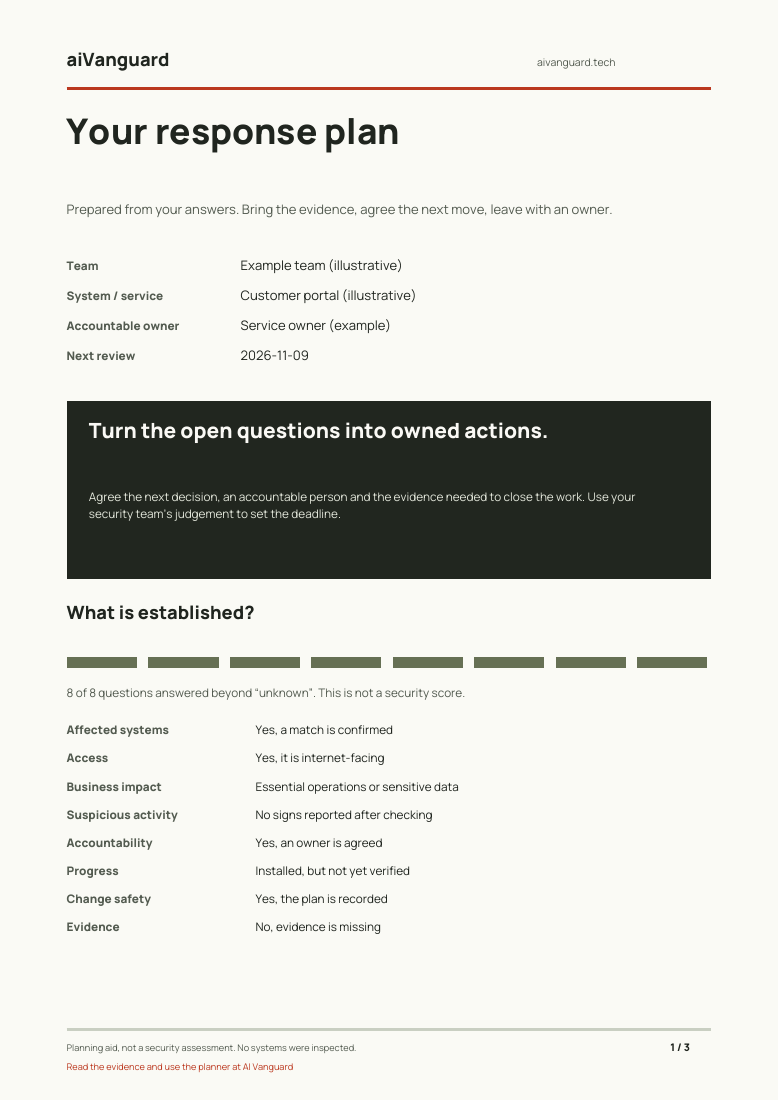
Your situation. Specific actions. Owners and dates. A clear definition of done.
See an example PDFIllustrative answers, not a real company assessment.Your answers stay in this tab and clear on reload. No account or email required. Only usage events are measured; answers and names are not sent.
Prefer to work on paper? Take the meeting brief, action register and evidence checklist with you.
Download the Patch Verification Meeting Kit (PDF)The personalised planner needs JavaScript. The PDF works without it.
What this tool does—and where judgement matters
This is an editorial planning aid based on your answers. It does not scan systems, verify evidence, calculate breach probability or certify security. Your technical owner sets the response priority and deadlines. Suspected compromise should go through your organisation’s incident process.
The questions draw on the CISA vulnerability response playbook: establish applicability, prioritise, remediate and verify. This is not an official CISA assessment.
Your next action depends on what you run
If you just want your own devices looked after
Use the official update mechanism for your browser and operating system. Complete any requested restart. On a managed work device, check with IT before changing an update policy.
For a Mozilla-installed desktop Firefox, the About Firefox window checks for updates and offers a restart when needed. Microsoft Store and Linux package-manager installations use their respective update channels. Mozilla documents the differences in its update guide [7].
If you run a business but not its infrastructure
Send the action plan to the person who owns IT or to your service provider. Ask which relevant advisories affect your systems and which responsibilities belong to you. Request an answer with evidence, even when that answer is “not affected.”
Three quick answers
Does this mean Linux has been hacked?
The research reports controlled exploitation of vulnerabilities. It does not establish a compromise of your device or organization. Check relevant advisories and your actual configuration.
Can I use GPT‑6 Cyber in ordinary ChatGPT?
OpenAI describes access through its restricted Daybreak Red program. The model’s launch does not imply general access for every ChatGPT account. [4]
Does the figure of 948 mean 948 fixes are installed?
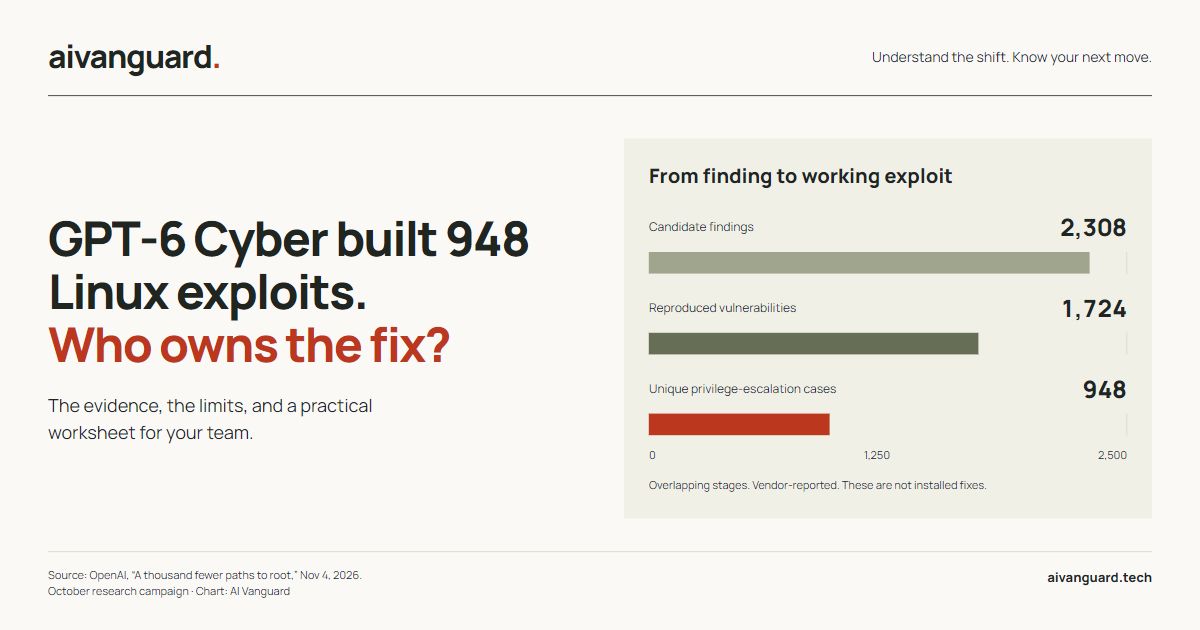
No. Demonstrating an exploit, proposing a patch, shipping a release, and installing that release are separate events. The chart does not measure installed updates.
Research appendix
The Linux campaign, the Firefox advisory tally and the Equifax investigation explain how findings move through different organizations. The Kubernetes lab above uses the separate Brotli case.
GPT‑6 Cyber Linux exploits: What the 948 count measures
From a finding to a working exploit
OpenAI Linux campaign · October 2026 · Count
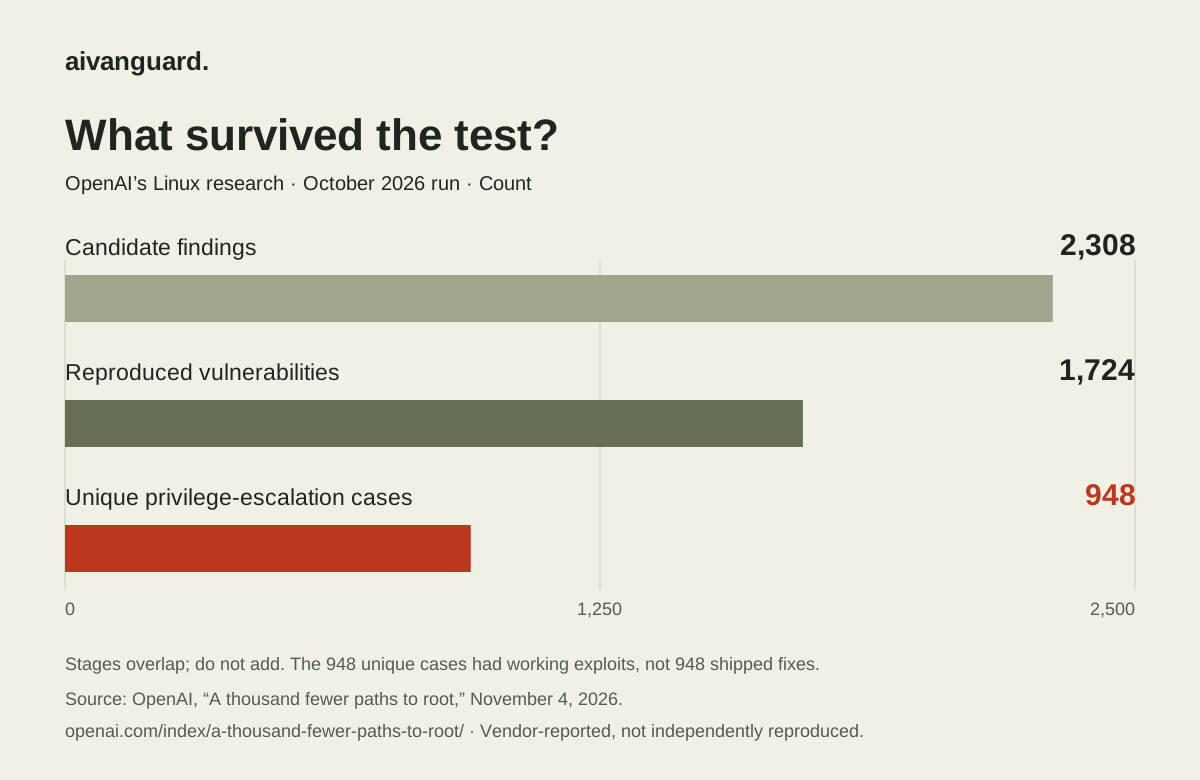
The research describes a mid-October campaign: 2,308 candidate findings, 1,724 reproduced vulnerabilities, and 948 unique local privilege-escalation cases backed by working exploits. The unique count was based on distinct patches after variant analysis. [2]
The kernel is the part of Linux that manages core system resources and permissions. A local privilege-escalation exploit can turn an existing low-privilege foothold into greater control. The research does not establish that every Linux installation is vulnerable or that these flaws are being exploited in the wild. [2]
OpenAI’s launch announcement says it disclosed 304 critical findings with candidate patches. That is a disclosure count, not a count of installed updates. Subtracting it from 948 would not tell you how many systems remain vulnerable. [1]
The distance between “found” and “fixed”
- FindingEvidence that a flaw exists
- ApplicabilityDoes our version or setup match?
- OwnershipWho acts, and how urgently?
- ChangeTest and deploy the official fix
- VerificationConfirm the running system
This is where I would challenge both the enthusiasts and the skeptics. Dismissing working exploits as a chatbot demonstration understates the evidence. Treating a successful demonstration as proof that a company is now protected overstates it.
A Linux fix reached an Ubuntu package
- What OpenAI disclosed
- OpenAI’s October 23 containment report names CVE-2026-80521 in its broader kernel work. We couldn’t verify which model worked on this issue or whether it was one of the 948. [15]
- Where the fix shipped
- Canonical dates the public CVE to August 26. The kernel team identifies the fix as
594d905in Linux 7.2 and lists backports for other kernel lines. Canonical’s November 3 notice covers the same CVE, and its tracker lists7.0.0-42.42as a fixed package for Ubuntu 26.04 LTS’s standard kernel. That’s 69 calendar days from the public CVE date to that specific notice. Other package lines have their own timelines. [16] [17] [18]
We checked the Firefox advisory. Attribution has limits.
Mozilla advisory 2026-118 lists fixes in Firefox 159. We counted its 167 unique CVE entries and found 41 with OpenAI in the reporter credit, split as follows. [3]
Our count of the maintainer’s record
| Reporter credit | Entries |
|---|---|
| Amy Burnett of OpenAI | 7 |
| OpenAI Codex Security (kylebot) | 34 |
| OpenAI-credited total | 41 |
How we checked it
We counted unique CVE headings, read each Reporter field and selected credits containing “OpenAI.” Two parsers produced the same result. The downloadable Python script uses the standard library; its method record includes a hash of the captured source.
Reporter credit is not model attribution. This advisory does not identify those entries as GPT‑6 Cyber results. Our count therefore cannot validate OpenAI’s broader claim of 81 previously unknown Firefox vulnerabilities. [1] It does give us a concrete maintainer record to follow into an update process.
Equifax patch management case study: Where the response broke down
In March 2017, Equifax told staff to fix an Apache Struts flaw within 48 hours. Its alert missed a developer who knew the software was in use, and a scan missed the vulnerable dispute portal. Attackers got in through the portal in May. Equifax applied the patch in August. Here’s how two other credit bureaus handled the same alert. [8] [9]
TransUnion knew who owned the systems
TransUnion used its inventory to identify the people responsible for affected systems. It patched some instances within days. Others took longer, including products that needed a fix from their supplier. TransUnion told investigators it had addressed all affected instances by August 2018. [9]
Experian checked a specific server
A targeted scan found a vulnerable server. The scan report recorded that the affected port had been blocked from internet access. That was evidence of containment. The Senate report records October 24, 2017, as the date Experian had fully addressed the flaw in its U.S. applications. [9]
What I’d ask for in the next meeting: the system name, the person responsible and a dated check that shows what’s running today. If the team has blocked access while it waits for a patch, ask who will verify the permanent fix and when.
“Critical” describes capability. It is not a diagnosis of your laptop.
OpenAI gives GPT‑6 Cyber a Critical cybersecurity capability designation under its Preparedness Framework. Access is restricted through Daybreak Red, with verification and security requirements. This is not a general invitation to let a chatbot test arbitrary systems. [4]
The system card also reports limitations alongside improvements. For example, the model stopped in 73% of evaluation cases where a warning warranted stopping. A strong result on one scope-following test cannot stand in for perfect behavior across every task. [4]
If your team evaluates a security agent, require explicit targets, permissions, and a way to stop it. Ask what its logs let a human reconstruct. A model’s capability score cannot answer who has authorized a particular action in your environment.
Sources and reporting notes
Research-based analysis, checked November 6, 2026. Our original work is the reproducible advisory tally, patch trace, Kubernetes rollout lab, workflow diagram, action planner and read-only Kubernetes checker. We have not independently reproduced OpenAI’s exploits, tested GPT‑6 Cyber or audited a company’s devices. The 2017 Apache Struts case draws on the GAO and Senate investigations. The downloadable sample plan uses illustrative inputs. Prepared with AI-assisted research and drafting; Responsible editor: Ehab Al Dissi.
- OpenAI: Introducing GPT‑6 Cyber, November 5, 2026. Model launch, Firefox findings and Linux disclosures.
- OpenAI: A thousand fewer paths to root, November 4, 2026. Linux research, counts, methodology and API costs.
- Mozilla Foundation Security Advisory 2026-118, October 27, 2026. Fixed Firefox vulnerabilities and reporter credits.
- GPT‑6 Cyber System Card, November 5, 2026. Access restrictions, capability designation and evaluation limitations.
- NIST SP 800-40 Revision 4, April 2022. Enterprise patch-management planning.
- UK NCSC: Responding to active exploitation. Rapid response and operational coordination.
- Mozilla: Update Firefox to the latest release. Update channels and restart instructions.
- U.S. Government Accountability Office: Equifax breach report, August 2018, pp. 16–17. Missed alert recipients and the scan of the dispute portal.
- U.S. Senate Permanent Subcommittee on Investigations: How Equifax Neglected Cybersecurity and Suffered a Devastating Data Breach, March 2019, pp. 35–42 and 59–62. Patch chronology and the TransUnion and Experian responses.
- Brotli 1.2.1 release. October 21, 2026. Upstream release listing CVE-2026-111497.
- Brotli fix commit 0ed4268. Upstream change referenced in the Node.js release notes.
- Node.js October 21 security advisory. Affected release lines and credit for the Brotli report.
- Node.js 24.22.1 release notes. October 21, 2026. Names the upstream patch included in the release.
- Microsoft .NET out-of-band release record. October 25, 2026. Fixed versions and publication status for installers and container images.
- OpenAI’s containment research. October 23, 2026. Names CVE-2026-80521 as part of its broader kernel work.
- Linux kernel CVE team’s record for CVE-2026-80521. Upstream fix commit and fixed kernel release lines.
- Canonical’s package status for CVE-2026-80521. Public CVE date and fixed Ubuntu package versions.
- Ubuntu Security Notice USN-8959-1. November 3, 2026. A dated distribution update covering the issue.
- Kubernetes image tags and digests. How to identify a specific container image.
- Kubernetes rollout status reference. How to check a Deployment rollout.
- Microsoft’s .NET deployment guide. How shared and bundled runtimes receive security updates.
- Kubernetes EndpointSlice documentation. Service membership and endpoint readiness conditions.
Corrections: contact AI Vanguard.